In the first article in this series I gave a coding agent access to a real environment. We connected a laptop to a live Kubernetes cluster, had an agent build a feature against real dependencies, and debugged a cross-service bug with traffic recording and local overrides. Everything there was still open-loop. The agent had the tools, while a human ran curls, checked the UI, and decided whether each step worked.
An executable pass/fail check closes that loop. The agent can then spin up a sandbox, run the check, read the failure, fix the code, and re-run until it passes. The human only shows up when there's something worth reviewing.
We'll do that with two Signadot building blocks: Plans and Skills. Then we'll deliberately break a service contract to watch the loop close on camera.
You might also like:
Local development with coding agents on Kubernetes using SignadotThe gap: agents can't tell you if a change is correct
The bugs that hurt in a microservices system are the ones that cross service boundaries. An agent renames a field in one service. The build and unit tests pass, and the linters are happy. By every signal available inside that service, the change is done.
And then the frontend, which still reads the old field name, renders an empty screen. Nothing in the change set says so, because no unit test crosses the service boundary. This is the class of bug that survives until staging or production, and it's getting worse: when agents open pull requests at agent speed, "we'll catch it in staging" stops being a strategy.
Agents need an executable way to express "this user-visible behavior must keep working" and run that check against a real environment before a human reviews anything.
Two concepts: Plans and Actions
A plan is a small, reusable validation workflow that runs against a live environment. It defines "correct" for one user-visible behavior and returns a pass or fail when an agent runs it.
Plans are built from actions: typed, deterministic building blocks like "execute an HTTP request," "run a Playwright browser flow," "run a k6 load test," or "assert on a result." Each action has defined inputs, outputs, and behavior, so you compose plans instead of writing the mechanics of driving a browser or firing load.
Ownership is split:
- The action catalog is owned by your platform team. It's the set of primitives allowed to run against your cluster, so governance lives in the catalog. The catalog is open source at github.com/signadot/actions, and every action is documented as a markdown contract: inputs, outputs, behavior.
- Plans are authored by developers and agents, on top of that catalog, and versioned right next to the code they validate.
When a skill drafts a plan, it reads those contracts as an API reference and composes actions from documented argument names.
A good plan has three properties:
- It validates exactly one user-visible behavior (narrow, not a kitchen sink)
- It carries a natural-language selection hint, a one-line description of what it validates and how an agent figures out which plan applies to a given change
- It's versioned next to your code, so it evolves with the service it tests.
Over time you accumulate a library of executable expectations agents can pick from based on the diff in front of them.
Two skills: one authors, one runs
There are two skills because authoring a plan and running one are different jobs. Keeping them separate keeps each skill simple.
signadot-planis the author. You describe what to validate in plain language, such as "drive the booking flow and assert the itinerary renders." The skill reads the action catalog, drafts the plan spec, runs it once against the baseline cluster to prove the plan itself works, and tags it under a stable name. You author once; you replay anytime.signadot-validateis the runner. It reads your diff, picks the right plan automatically using the selection hint, spins up a sandbox with your change wired into the live cluster, and runs the plan against it. When the plan fails, it reads the failure, traces it to the real cause (even if that's in a different service than the one you changed), fixes the code, and re-runs until the plan passes.
Rendering diagram…
The skills work with GitHub Copilot agent mode, Claude Code, Cursor, or anything that supports the skills format. They use the Signadot MCP server when it's available and fall back to the CLI otherwise.
Prerequisites
This builds directly on the first article: same HotROD app, same cluster, same
signadot local connect. On top of that you'll need:- A Signadot account with the Signadot operator installed on your cluster
- Signadot CLI (recent version; check with
signadot version) - The HotROD demo app running in the
hotrodnamespace, withsignadot local connecthealthy - A coding agent with skills support (Copilot agent mode, Claude Code, or Cursor)
jqfor inspecting CLI output
Enable the Plan Runner
Plans require a Plan Runner Group in the cluster. Enable it per cluster from the dashboard: one toggle, no YAML. The runner executes plan steps inside the cluster, right next to the services they validate.
Open app.signadot.com/platform/managed-runners and confirm your cluster shows
1/1 runner ready. On the same page, the Plan Runner Actions panel controls which actions are allowed to run on the cluster; the platform team uses it to decide what agents can compose with.Inspect the action catalog
The catalog is open source. Browse github.com/signadot/actions and open an
ACTION.md (for example, playwright/ACTION.md) to see the typed inputs and outputs. You can list what's enabled on your cluster from the CLI:signadot plan action list
Install the skills
From the HotROD repo root:
npx skills add signadot/agent-skills
This drops
signadot-plan and signadot-validate into the repo. Confirm they landed:ls .github/skills/
Then ask your agent "What Signadot skills do you have available?" It should report both.
Part 1: Author a validation plan from one prompt
A user picks a pickup and a dropoff, requests a ride, and gets an itinerary showing both location names. This flow touches the frontend, the route service, the location service, and the database. A plan for the flow catches contract breaks that stop the itinerary from showing both names.
In your agent panel, prompt (replace
<your-cluster> with your cluster name):Prompt
Create a Signadot plan tagged
hotrod-e2e-ride on cluster <your-cluster> that drives the HotROD frontend with Playwright: pick a pickup and dropoff location, click Request Ride, and assert the itinerary shows both location names. Take an optional routing key param so the same plan can validate against a sandbox, and make the plan fail when the test fails.After the prompt, the
signadot-plan skill runs four steps:- Reads the action catalog. It lists what's enabled on the cluster and reads the Playwright action's contract before composing the plan.
- Drafts the plan. A Playwright script walks the booking flow and conditionally injects the routing-key headers (
baggageandtracestate) when the routing key param is set. These are the same headers the Chrome extension injects for sandbox routing. The plan uses the same routing mechanism as the extension. It also wires in acheckstep that asserts the Playwright run exited zero, so the plan's overall result reflects the test result. - Proves the plan works. It creates the plan and runs it once against the baseline cluster with no sandbox and the real frontend, services, and database. This catches errors in the plan before you rely on it.
- Tags it, so the plan is addressable by name forever after.
The optional routing key makes the plan reusable. Without a key, it validates the baseline cluster. With a sandbox's key, the same plan validates that sandbox.
When it's done, verify from the CLI:
signadot plan tag get hotrod-e2e-ride -o json | jq '{name, plan: .plan.id, selectionHint: .plan.spec.selectionHint}'
You'll see the tag pointing at the plan, with a populated
selectionHint: the one-line, agent-readable description of what this plan validates. The validate skill later uses this hint to find the plan automatically.signadot plan list
In the dashboard under Plans, the plan has a spec and a run history with that green baseline run. The Playwright action captures artifacts, so you can open a run and watch the browser trace. Because the plan is tagged, anyone or any agent can replay it with one command:
signadot plan run --tag hotrod-e2e-ride
Part 2: Break a contract and watch the loop close
We'll make a change that slips through every single-service check, then hand it to
signadot-validate.Make the breaking change
Ask the agent for a perfectly reasonable refactor:
Prompt
In
services/location/interface.go, rename Name on the Location struct to LocationName. Update the json tag to match and make sure the build is clean.The agent does the rename, updates the JSON tag, fixes the call sites inside the location service, and the build comes back clean. Run the location service unit tests:
go test ./services/location/...
They pass.
git diff --stat shows the change is scoped entirely to services/location/. By every signal the agent has inside this service, the change is done.But the frontend still reads the old field. The location service now serves
locationName; the React app reads name. Nothing in the change set says so because no unit test crosses the service boundary. The failure appears only under real, end-to-end traffic.Rendering diagram…
Hand it to the validate skill
Before this becomes a PR, one prompt (replace
<your-cluster>):Prompt
Validate this location-service change against the
hotrod-e2e-ride plan on cluster <your-cluster>.Everything from here is
signadot-validate working autonomously, in phases:- Sandbox setup. It picks up your
local connectsession, creates a sandbox that local-maps thelocationworkload to your machine, builds the binary from your changed source, pulls the real cluster environment viasignadot sandbox get-env, and startshotrod locationlocally. - First plan run → FAIL. It runs
hotrod-e2e-ridewith the sandbox's routing key, so the Playwright traffic in the cluster routes to your changed service. Playwright walks the booking flow, the itinerary never renders, and the visibility assertion times out. Within minutes, the plan catches a bug that the service-local build and tests missed. - Trace and fix. Because the diff only changes the location service, the skill searches for consumers of its response. It finds the call sites in the React app reading the old
namefield, updates each tolocationName, rebuilds the frontend, and addsfrontendto the sandbox as a second locally-mapped workload because both changed services now need validation together. - Re-run → PASS. The plan goes green. The itinerary renders with both location names, through both modified services, against the real cluster.
- Final report. Sandbox name and routing key, every file touched across both services, the processes left running, and the cleanup commands. It deliberately leaves the sandbox up so you can inspect everything.
Verify with your own eyes
Activate the validation sandbox with the Signadot Chrome Extension and walk the ride-request flow at http://frontend.hotrod.svc:8080. The fixed services running on your machine serve an itinerary with both names.
Then open the plan's run history in the dashboard. This is my favorite frame of the whole demo:
Note
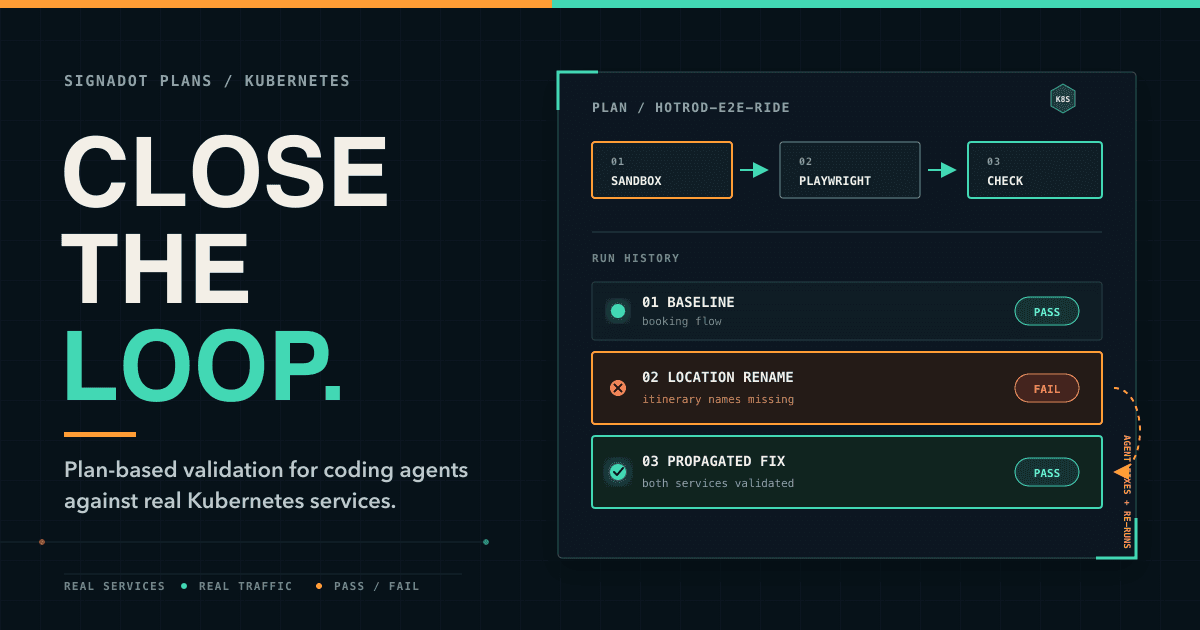
green (baseline) → green (replay) → red (the rename hit a real environment) → green (after the fix)
The agent completed that red-to-green transition inside its session, before any human saw a PR.
Tear down
Two commands, straight from the skill's report (use the actual sandbox name it printed):
pkill -f '/tmp/hotrod-bin'
signadot sandbox delete validate-location-rename
Compared to debugging by hand
In the first article we debugged this exact class of bug manually with traffic recording, response payloads, and an override server. Those tools still work well for interactive debugging. Here, the plan runs the loop. The agent iterates against a real environment until the plan passes, and the run history gives a reviewer an auditable record.
The governance angle
For platform teams, the action catalog is the control plane. Your platform team owns what's allowed to run against the cluster; developers and agents compose plans on top of approved primitives. Agents get autonomy; you keep control. The catalog limits each validation loop to approved primitives.
The outer loop: validation on every pull request
Everything here is still the inner loop: one developer or agent working locally. The PR validation article covers the outer loop, where CI creates a stable sandbox for every pull request, runs tests as in-cluster Jobs, and gives reviewers a live preview. It also uses disposable Neon branches to keep schema changes and test data away from the baseline database.