If you went through the previous articles on the topic, you might have thought, "Ok, all good, but my system has a Kafka topic, we have a workflow engine, a database with schema migrations. There's no way you can sandbox that."
Well, this article talks about exactly that. In the first article, we connected a laptop to a live Kubernetes cluster and routed only our traffic to code running locally. In the follow-ups, we scaled that idea to every pull request and closed the validation loop for coding agents. All of it relied on the same assumption: a request comes in, a response goes out, and a routing header decides where the request goes.
Message queues break that assumption. Nobody "routes" a Kafka message. Instead the consumers pull. Workflow engines break it even harder. Temporal owns its own task queues, its own state, and its own retries. There's no header to route on because there's no request. And some things a sandbox needs aren't Kubernetes workloads at all.
This article covers the following topics:
- Data isolation as a spectrum, and when you actually need more than the default
- Selective consumption on message queues: one topic, one broker, full isolation. The same pattern applies to Kafka, RabbitMQ, Pub/Sub, SQS/SNS, and NATS
- Resource plugins: the extension point that provisions anything a sandbox needs (e.g. a database branch or a topic per sandbox)
- Temporal and routing a workflow to a sandboxed worker, using Temporal's own retries as the mechanism
You might also like:
Isolation is a dial, not a switch
Before the more complex cases, let's restate the principle that makes everything in this series easy to accomplish. Share by default, isolate only what the change demands.
For state, that gives you three options:
The data isolation spectrum
Rendering diagram…
- Share it. By default, a sandboxed service talks to the same database as the baseline. This works as long as whatever's writing the data creates its own unique ID and only ever touches rows it created itself. That covers most changes: a new endpoint, changed logic, a dependency bump. You're using real data and don't need to set up anything new. If your test data can collide with someone else's (shared fixture rows, overwritten global state), you need at least the next option below.
- Partition it. When your tests write data, the next step is logical partitioning. It's the same database, but the sandbox works on its own rows. It has its own tenant ID, its own key prefix, its own ID range. Fairly cheap and straightforward to do.
- Branch it. Only at the far end do you need a database per sandbox. That's when you're doing schema changes or destructive migrations. This splits into two cases depending on what your database supports:
- Native branching: Databases like Neon offer copy-on-write (COW) branching, so a full branch is cheap and fast. In the PR validation article we built a Neon resource plugin that gave every sandbox its own branch. It was created in seconds, seeded with the parent's schema and data, then deleted when the sandbox was deleted.
- No native branching: Without COW support, the resource plugin instead spins up a fresh database instance on demand and seeds it with the data the sandbox needs. This option is slower and more resource intensive than a native branch, but the same mechanism still applies.
Most sandboxes fall under the first option. The other two you get through resource plugins.
What are resource plugins
Resource plugins let sandboxes provision anything that isn't a Kubernetes workload: database branches, Kafka topics, S3 buckets, anything that can be scripted.
You define a plugin in YAML and deploy it once at the organization level. It has three parts:
Rendering diagram…
- Create steps run in your cluster (as plain pods) when a sandbox requests the resource. They can call any API. Example: install an AWS CLI, provision an S3 bucket, etc.
- Outputs are files the create step writes under
/outputs. Example: a connection string, a topic name, an ID. - Delete steps run when the sandbox is deleted, and they can read the create step's outputs via
valueFromStepto tear down exactly what was built. Example: deleting the provisioned S3 bucket.
The sandbox spec requests the plugin with parameters, and the forked workload receives the outputs as environment variables. The workload doesn't know it's special. It reads
DATABASE_URL or anything else like it always has.Hands-on prerequisites
We'll use the same base environment as the previous articles: a Kubernetes cluster (I'm using kind), the Signadot operator installed, and the CLI authenticated. On top of that:
- The Signadot browser extension installed and logged in
- A clone of the signadot/examples repo as both demos live there
- For the Temporal part: Docker to build two images locally, and enough cluster headroom (Kafka + Temporal together want ~8 GB on Docker Desktop)
Sandboxing Kafka
There are two ways to isolate message traffic on a queue. First one is to selectively consume messages based on a routing key carried in the message headers. This requires consumer-side code changes, though this can live in a shared library. The second way is to provision ephemeral topics per sandbox via a resource plugin, with producers and consumers reconfigured to use them.
This article focuses on the first approach since it needs no new infrastructure per sandbox.
We'll use a demo app with three services (frontend, producer, and consumer), one Kafka topic in the middle, and a Redis-backed event log so we can watch every hop a message takes. The whole thing comes from
selective-consumption-with-kafka:cd examples/selective-consumption-with-kafka
kubectl create ns kafka-demo
kubectl -n kafka-demo apply -f k8s/pieces
Once the pods settle (Kafka on kind takes a few minutes), create two sandboxes. A fork of the producer and a fork of the consumer, plus a route group that ties them together under one routing key:
signadot sandbox apply -f ./signadot/sandboxes/producer.yaml --set cluster=<your-cluster-name>
signadot sandbox apply -f ./signadot/sandboxes/consumer.yaml --set cluster=<your-cluster-name>
signadot routegroup apply -f ./signadot/routegroups/demo.yaml --set cluster=<your-cluster-name>
Port-forward the frontend and open it:
kubectl port-forward service/frontend -n kafka-demo 4000:4000
Publish a message on baseline and the log shows exactly what you'd expect. Every hop labeled
(baseline), no routing key:routingKey: ""
frontend (baseline) Sending publish request to producer API.
producer (baseline) Publishing message to kafka (topic=kafka-demo).
consumer (baseline) Consumed message from kafka (topic=kafka-demo).
Now look at the pods in the cluster:
kubectl -n kafka-demo get pods
There are two consumers, the baseline and the sandboxed fork, both subscribed to the same topic. With HTTP, the sandbox routing layer sits in the request path and routes by header. But Kafka consumers pull. So when a message lands on the topic, who gets it?
A separate broker per sandbox brings back environment sprawl, the exact thing we don't want. A topic per sandbox means every producer needs to know about every sandbox that exists.
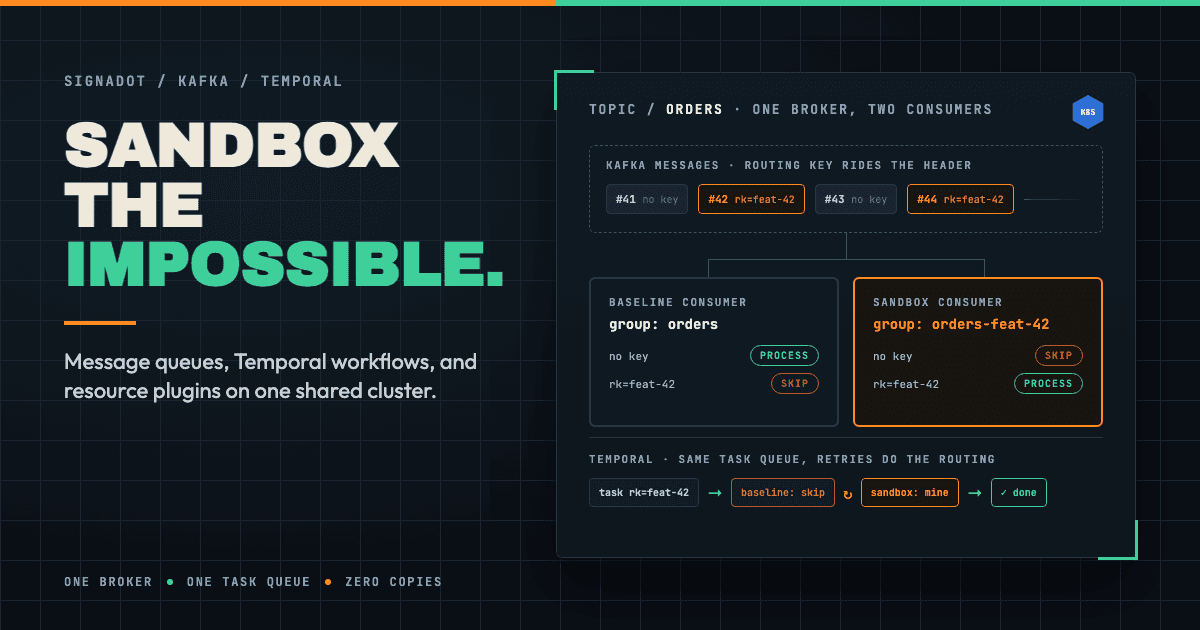
So instead, everyone gets every message. Every consumer sees every message and exactly one of them acts on it. Three pieces make that work:
1. The routing key rides the message. The routing key already travels with the request as OpenTelemetry baggage (
sd-routing-key). The producer takes that key and writes it into the Kafka message headers:// src/apps/producer/app.js — the producer just forwards the baggage
app.post('/api/publish', (req, res) => {
let routingKey = extractRoutingKey(req.get('baggage'));
// ...
publishMessage(kafkaTopic, msg, { baggage: req.get('baggage') })
So the key rides the message into Kafka and comes out the other side, no broker changes needed.
2. The sandboxed consumer joins a unique consumer group. This is the Kafka-specific move. A consumer group with a unique name (the group ID suffixed with the sandbox name) gets its own copy of the full stream, independent of the baseline group. Both consumers now see everything. Signadot injects
SIGNADOT_SANDBOX_NAME into every forked workload, so the code can tell which mode it's running in.3. Each consumer makes one decision per message. Here's
src/modules/routesapi-mq-client/pullrouter.js:function shouldProcess(routingKey) {
const routingKeys = cache.get('routingKeys');
if (sandboxName !== "") {
// we are a sandboxed workload, only accept the received routing keys
return routingKeys.has(routingKey)
}
// we are a baseline workload, ignore received routing keys (they belong
// to sandboxed workloads)
return !routingKeys.has(routingKey)
}
The sandboxed consumer asks: is this my routing key? Process it, otherwise skip. The baseline consumer asks: does this key belong to an active sandbox of this service? Skip it, someone else has it covered. Everything else falls through to the baseline: no key, a stale key from a deleted sandbox, another service's key. No messages are dropped.
And where does that
routingKeys cache come from? The consumers ask the routeserver, an API the Signadot operator runs inside your cluster at routeserver.signadot.svc:7778. It exposes the same routing rules the service mesh layer uses for HTTP, but for your code to consume (Routes API — gRPC and REST). The client polls it every few seconds and caches the set of active routing keys:// pullrouter.js — which sandboxes exist for MY baseline workload?
var routeServerURL = url.format({
protocol: 'http',
host: routeServerAddr, // routeserver.signadot.svc:7778
pathname: '/api/v1/workloads/routing-rules',
query: {
baselineKind: 'Deployment',
baselineNamespace: 'kafka-demo',
baselineName: baselineName,
},
});
The consume loop ties it together: extract the baggage from the message headers, check, then process or skip:
// src/apps/consumer/app.js
consumeMessages(kafkaTopic, (msg, headers) => {
    let baggage = headers['baggage'] ? headers['baggage'].toString() : "";
    let routingKey = extractRoutingKey(baggage);
    if (!shouldProcess(routingKey)) {
        return  // not ours, skip
    }
    registerEvent('Consumed message from kafka (topic=' + kafkaTopic + ')', msg, routingKey, ...)
})
The same core idea, the consumer deciding whether a message is theirs, applies across brokers, but the mechanics split into two groups depending on whether the broker supports fan-out:
- Fan-out brokers (Kafka, Google PubSub, RabbitMQ): Each sandboxed consumer gets its own full copy of the stream (e.g. a unique consumer group in Kafka, its own subscription in Pub/Sub) and independently applies the same accept/skip decision.
- No fanout (SQS): There's only one queue and only one consumer gets each message. Baseline and sandbox consumers instead coordinate on that single delivery. A consumer that receives a message not meant for it releases it immediately (e.g. resetting the visibility timeout) so another consumer can pick it up, rather than each one seeing every message independently.
You can check out Signadot's examples repo for working examples across brokers. The decision logic (accept or release) is the same shape everywhere. The only thing that changes is how a "not mine" message gets back into circulation for the right consumer.
How to sandbox a Temporal workflow worker
If message queues are supposed to be hard, workflow engines are supposed to be impossible. Temporal owns its own task queues, its own persistence, its own retries. There's no request path to intercept.
Temporal workers pull tasks from a shared task queue. Deploy a second worker with your experimental code, even a broken one, and it immediately starts competing for real production tasks. There is no safe way to "just deploy it and see."
Let's sandbox it anyway. I'll use the
temporal-tutorial, which has a money-transfer app with a Python client UI and a Temporal worker.Deploy the baseline
cd examples/temporal-tutorial

# Temporal server + web UI
kubectl create namespace temporal --dry-run=client -o yaml | kubectl apply -f -
kubectl -n temporal apply -f k8s/temporal/

# Build the two app images locally...
(cd temporal_worker && ./build.sh)     # → temporal-money-transfer:v1.0
(cd py_client && ./build.sh)           # → temporal-py-client-ui:v1.0

# ...and load them into kind (they're not on a registry)
kind load docker-image temporal-money-transfer:v1.0 --name <kind-cluster-name>
kind load docker-image temporal-py-client-ui:v1.0 --name <kind-cluster-name>

# Baseline worker + client UI
kubectl -n temporal apply -f k8s/worker-deployment.yaml
kubectl -n temporal apply -f k8s/temporal-py-client-ui-deployment.yaml
The manifests do not all declare
metadata.namespace, so the -n temporal flags are required. Run these port-forwards in separate terminals:kubectl -n temporal port-forward svc/temporal-py-client-ui 8080:8080
kubectl -n temporal port-forward svc/temporal-ui-service 8088:80
Open the client UI at
http://localhost:8080 and the Temporal web UI at http://localhost:8088. Submit a money transfer and watch the baseline worker execute it.The same ownership principle as Kafka applies here, but not Kafka's fan-out mechanics. Temporal delivers each task attempt to one polling worker. If that worker does not own the routing key, it fails the attempt and Temporal retries it for another poller. The plumbing runs through Temporal's own machinery:
Routing a Temporal workflow to a sandboxed worker
Rendering diagram…
Client side: the key gets persisted with the workflow. The Temporal SDKs ship an OpenTelemetry tracing interceptor that propagates the active OTel context (including the
sd-routing-key baggage) into the workflow submission, where it's stored in the workflow headers inside Temporal's own persistence. This is one line of configuration:# py_client/temporal_client.py
client = await Client.connect(
temporal_server_url,
interceptors=[TracingInterceptor()]
)
That's durable: however long the workflow runs, minutes or days, the routing key travels with it, and with everything the workflow schedules (activities, child workflows, continue-as-new).
On the worker side, the interceptors make the same decision as the Kafka consumers made. The tutorial packages everything into a
SandboxAwareWorker. Application workflows and activities contain zero Signadot- or OTel-specific code:# temporal_worker/main.py — the only integration point applications see
worker = SandboxAwareWorker(
task_queue=task_queue,
workflows=[MoneyTransferWorkflow],
activities=[banking_activities.withdraw, banking_activities.deposit],
)
await worker.start()
Under the hood it registers a
SelectiveTaskInterceptor, one hook for workflow tasks, one for activities. Each extracts the routing key from the task headers and asks the routeserver whether this worker should handle it:# temporal_worker/signadot/routing.py
async def should_process(self, routing_key: Optional[str]) -> bool:
if self.sandbox_name:
# sandbox worker: only process MY routing keys
return routing_key is not None and routing_key in self._routing_keys_cache
# baseline worker: process everything that isn't claimed by a sandbox
return routing_key is None or routing_key not in self._routing_keys_cache
Same shape as the Kafka
shouldProcess(), same routeserver, only the transport is different.When the check says "not mine," the interceptor raises and this fails the task attempt, not the workflow.
Let's create the sandbox worker:
signadot sandbox apply -f sandbox/worker-sandbox.yaml --set cluster=<your-cluster-name>
kubectl -n temporal get pods -l app=temporal-worker    # two worker pods now
Two workers, both connected to the same Temporal server, both polling the same task queue.
The checked-in sandbox spec reuses the baseline
v1.0 image, which is enough to demonstrate task ownership. To test changed worker code, build and load a new tag, then add an image override to the sandbox fork:docker build -t temporal-money-transfer:v2.0 temporal_worker
kind load docker-image temporal-money-transfer:v2.0 --name <kind-cluster-name>
customizations:
    images:
        - image: temporal-money-transfer:v2.0
The worker manifest refreshes its routeserver cache every 120 seconds. Before sending routed traffic, wait for the baseline worker to log
RoutesAPIClient: Routing keys updated, or lower ROUTES_API_REFRESH_INTERVAL_SECONDS for a faster local demo. This prevents baseline from processing the routed workflow with a stale cache.Now select the worker sandbox in the browser extension, go back to the client UI, and submit another transfer. Watch both workers' logs side by side:
- The baseline worker often grabs the task first and skips it. The task attempt fails, and Temporal schedules a retry.
- The sandbox worker picks up the retry, passes its routing check, and runs the workflow to completion.
The retry attempts you see in the Temporal UI event history are the mechanism. Temporal's durability guarantees mean a skipped task comes back until the right worker takes it.
If we clear the routing context and submit one more transfer, the baseline worker handles it, and the sandbox stays silent. Your team's workflows never noticed any of this happening.
One more piece, and skipping it silently breaks downstream routing: activities usually make outbound HTTP calls to other services, and those calls must carry the routing key too, or sandbox routing stops at the worker.
The SDK tracing interceptors do not restore baggage around activity execution by themselves. In this tutorial the interceptors bridge the baggage from the task headers into the OTel context, scoped to each activity, so instrumented HTTP clients automatically send
baggage: sd-routing-key=... downstream. If you're building this for your own workers, don't skip that piece!Don't isolate infrastructure, isolate traffic
Zoom all the way out on the series and it's one picture:
One shared cluster, a sandbox for every shape of work
Rendering diagram…
One shared cluster, one continuously updated baseline, and a sandbox for whatever shape of work you're doing: a laptop wired into the cluster for local development, a sandbox for every pull request with tests running in-cluster, or queues, workflow engines, and ephemeral resources. The stateful stuff everyone assumed needed its own dedicated environment.
None of it needed a staging queue, an environment spreadsheet, or a nightly data-refresh job. Requests, messages, workflow tasks, and database writes all carry a single routing key that's free to attach and cheap to check.
Infrastructure is expensive and slow to copy. Luckily for us, traffic is free to label. Both demos in this article live in the signadot/examples repo if you want to try them yourself.